Opportunity Detection
From your connected mailbox
- Quote requests
- Purchase orders
- Follow-up threads
Gmail and Outlook access stays read-only.
Step 1 of 3
Build your pipeline from email.
Know which renewals need a follow-up.
For Account Managers handling quote requests, signed POs and follow-up threads in Gmail or Outlook. Review the deals Prism finds, get outreach reminders before each renewal and bring an up-to-date pipeline to your forecast review.
5 days free · No credit card required · Plans from $5/month
Read-only access. Prism cannot send, edit or delete your mail. Your full inbox is not shared with managers; extracted deal details can be shared in your workspace. Meeting suggestions need your approval. Privacy policy
Email detection can miss context or match the wrong client. Review what Prism finds. We have not published measured accuracy or customer results.
Email to opportunity
Gmail & Outlook
Renewals in focus
Playbooks & forecasts
Meetings to next steps
Suggestions you approve
60-second product demo
Illustrative example with fictional details—not a live recording or customer result.
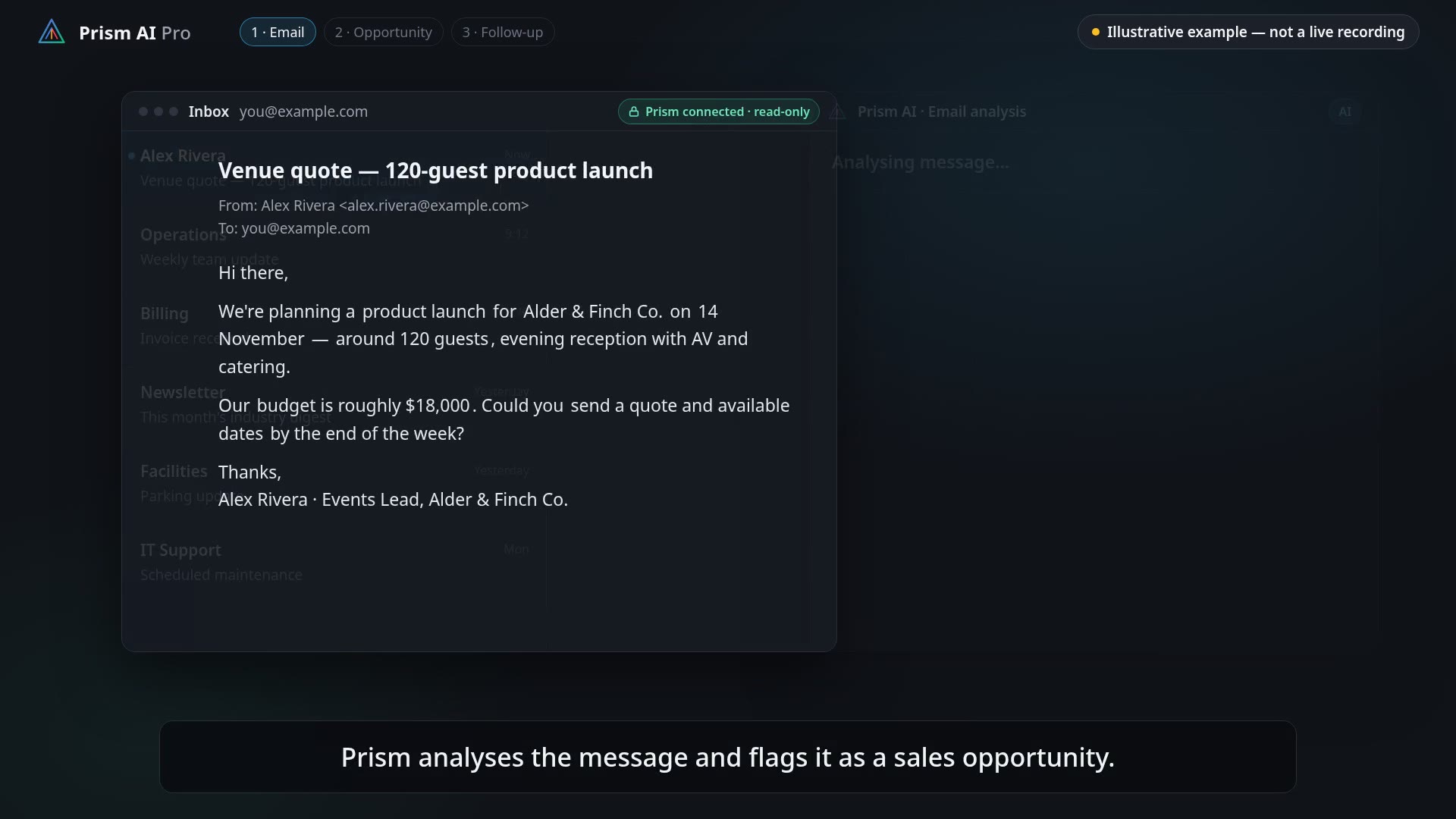
Review the client, deal value and suggested next step. Send the follow-up from your own mailbox; Prism’s mailbox access stays read-only.
FROM CONVERSATION TO ACTION
Track recurring customers, get outreach reminders before every cycle, and forecast renewal revenue with probability scoring and KPIs.
Prism scans quote requests, signed POs and follow-up threads to create or update opportunities automatically. Review extracted client details and next steps for accuracy.
Extracted opportunities feed your workspace pipeline. Deal details and derived notes can be shared with authorized teammates; the full mailbox is not a shared inbox.
Review follow-up tasks and cooling deals in your daily briefing, then choose what to act on. Your next steps, in one place.
Connect Fathom, Fireflies or tl;dv. Meetings are matched to the right client, action items extracted, and deal updates suggested for your approval.
Find clients and deals with global search, add records quickly, check health indicators and import or export CSV files.
Interactive workflow previews — not live screenshots or customer records.
From your connected mailbox
Gmail and Outlook access stays read-only.
Import from your notetaker
Meeting records stay private to their owner.
Steps tied to each renewal date
Edit the playbook or add your own steps.
See deals needing attention
The briefing highlights urgent and quiet opportunities.
THE RELATIONSHIP BEHIND THE RENEWAL
Bring outreach tasks, communication health and customer feedback into the same account workflow.
Explore renewal intelligenceEditable steps tied to renewal dates, completed by hand or matched email activity.
A 0–100 score with reasons, based on communication—not product usage.
One-question survey links, with answers feeding health and renewal forecasts.
Mark champions and decision-makers; flag quiet contacts and possible handovers.
From inbox to pipeline in minutes.
Connect your Outlook or Gmail (read-only access)
Prism AI Pro scans for opportunity signals in your inbox
Review automatically created opportunities and correct any mismatches
Track deals, recurring customers and upcoming renewal outreach
SECURITY & PRIVACY
Know what Prism can read, what it saves and what your team can see before you connect.
Gmail and Outlook connections let Prism read messages to find sales activity. Prism cannot send, edit or delete your mail through these connections. You sign in with Google or Microsoft; Prism does not ask for your mailbox password.
Message content is processed, including by AI providers, to identify sales activity. Extracted opportunity details and derived notes are saved in your workspace. Connection authorization is encrypted and stored on the server, not shared with teammates.
Authorized teammates can see shared opportunity records and derived notes in your workspace. Connecting your mailbox does not share your full inbox or give colleagues access to your connection. Meeting-derived deal changes need your approval.
Disconnect Gmail or Outlook from Integrations to stop future syncing and remove the stored connection. Existing opportunity records are not deleted by disconnecting. To remove your account and its data, use Settings → Security → Close account; the privacy policy explains deletion and retention.
Prism scans your connected mailbox for quote requests, purchase orders and follow-up signals. Qualifying detections can automatically create or update opportunities. AI can miss context or match a message incorrectly, so review the client, deal, value and next step. We have not published a measured accuracy rate. Meeting-derived deal updates require your approval.
Solo is $5/month and Team is $15/seat/month (was $29) during the Limited Time Sale. The advertised sale price is locked in for 12 months, not permanently. Contact sales@prismaipro.com to confirm the price and terms after that period before subscribing.
Gmail and Outlook access is read-only: Prism cannot send, edit or delete mail through these connections. Prism processes message content to identify sales activity and saves extracted opportunity details in your workspace. Those deal details and derived notes may be visible to authorized teammates; connecting a mailbox does not make the whole inbox a shared team mailbox. See our privacy policy for data handling and account-closure details.
You can disconnect a mailbox from Integrations and cancel a paid subscription through the Stripe billing portal linked on the Billing page. Paid access continues through the current billing period. Disconnecting a mailbox stops future syncing; it is not the same as deleting your account or existing opportunity records.
Limited Time Sale. Start free — no credit card required.
$19$5/mo
Limited Time Sale — locked in for 12 months
$29$15/seat/mo
Limited Time Sale — locked in for 12 months
Connect Gmail or Outlook in minutes with read-only access. Review every opportunity and approve meeting updates before they change your pipeline.
5 days free · No credit card required · Solo $5/mo · Team $15/seat/mo (Limited Time Sale)